Diacritics Every accent mark, ready to copy
17 marks · 131 letters · 23 languages
Tap any letter to copy it. Tap a few to build a word. Then learn to type them yourself on a Mac, Windows or your phone.
By Ash Lane, type designer · Updated November 2026
Nothing matches that. Try a single letter, like e, or a mark name, like caron.
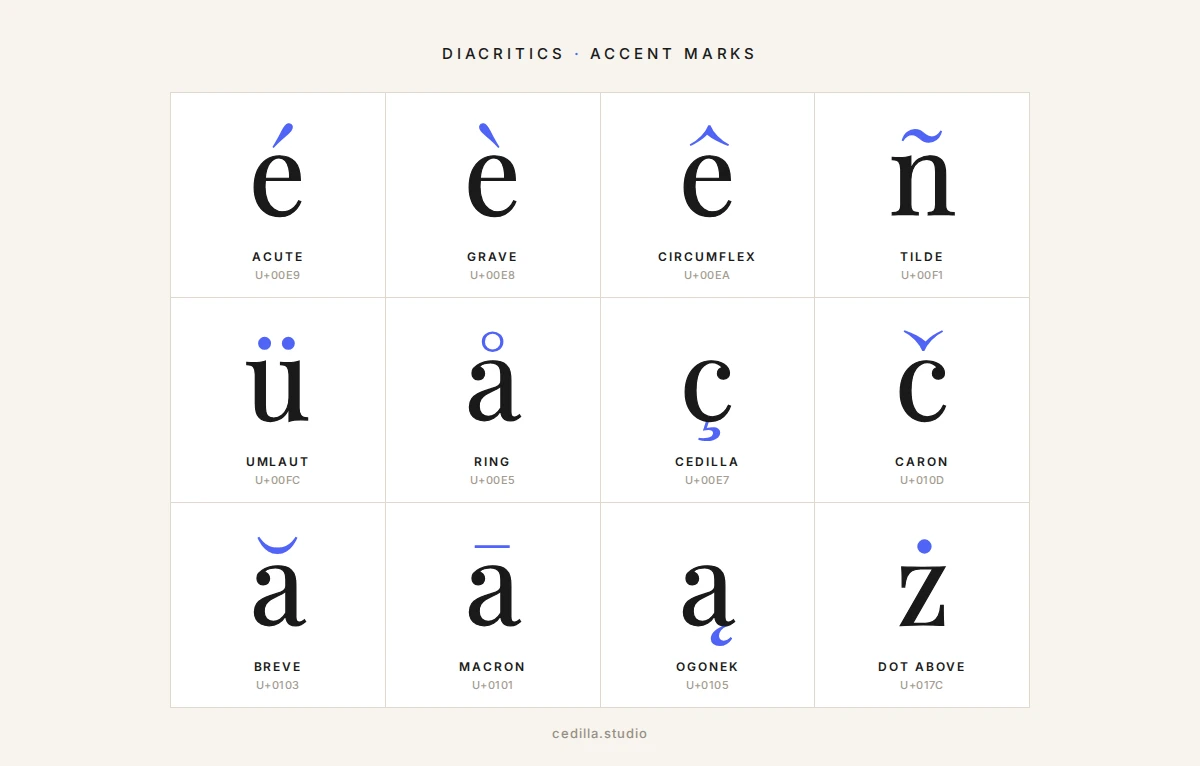
Acute accent aigu
Grave accent grave
Circumflex hat, accent circonflexe
Tilde squiggle, eñe
Umlaut / diaeresis trema, two dots
Cedilla cédille
Ring kroužek, ring above
Caron háček, wedge
Breve short mark
Macron long mark, kahakō
Ogonek little tail
Dot above overdot, kropka
Double acute Hungarumlaut
Stroke / slash bar, slashed letters
Comma below virgulă
Dot below underdot
Horn dấu móc
Special letters & punctuation not diacritics, but often needed with them
Spanish
French
German
Portuguese
Italian
Polish
Czech
Slovak
Turkish
Turkish has a dotted and a dotless i, so the capital of i is İ and the capital of ı is I.
Romanian
Hungarian
Croatian
Swedish & Finnish
Norwegian & Danish
Icelandic
Latvian
Lithuanian
Vietnamese
Esperanto
Welsh
Hawaiian
Māori
Pinyin tones
Copy alone gives you just the accent. Copy combining gives a version that sits on top of (or under) whatever letter comes before it, so you can put any mark on any letter.
How to type accent marks on a Mac
There are three ways. Press and hold is easiest for the odd letter. The Option shortcuts are quicker once you know them.
1. Press and hold the letter
Hold down a letter key, e for example, and a small menu pops up with its accented versions. Press the number under the one you want, or click it. It works in almost every app, and covers more than the shortcuts do, including č, ł, ż and ā.
If holding a key just repeats it (eeeeee), press and hold has been switched off. Paste this into Terminal, press Return, then quit and reopen the app you were typing in:
defaults write -g ApplePressAndHoldEnabled -bool true
2. Option key shortcuts
Press the shortcut, let go, then type the letter. For a capital, hold Shift as you type the letter. These work on the standard ABC and U.S. keyboards most Macs use.
| Mark | Press, then the letter | You get |
|---|---|---|
| Acute | Option + E | á é í ó ú |
| Grave | Option + ` | à è ì ò ù |
| Circumflex | Option + I | â ê î ô û |
| Tilde | Option + N | ñ ã õ |
| Umlaut | Option + U | ä ë ï ö ü |
One-step letters
These have their own shortcut. Add Shift for the capital.
| Letter | Press |
|---|---|
| ç Ç | Option + C |
| å Å | Option + A |
| ø Ø | Option + O |
| æ Æ | Option + ' |
| œ Œ | Option + Q |
| ß | Option + S |
| ¿ | Option + Shift + ? |
| ¡ | Option + 1 |
3. ABC Extended, for every other mark
Carons, macrons, breves and ogoneks need the ABC Extended keyboard. Add it in System Settings → Keyboard → Text Input → Edit → +, then switch to it from the menu bar.
| Mark | Press, then the letter | You get |
|---|---|---|
| Caron | Option + V | č š ž ř ě |
| Macron | Option + A | ā ē ī ō ū |
| Breve | Option + B | ă ğ ŭ |
| Ogonek | Option + M | ą ę į ų |
| Dot above | Option + W | ż ė ġ ċ |
| Double acute | Option + J | ő ű |
| Ring | Option + K | å ů |
| Cedilla | Option + C | ç ş ţ ķ |
| Stroke | Option + L | ł |
| Dot below | Option + X | ạ ẹ ọ |
Two keys move on ABC Extended: Option + A becomes the macron instead of å, and the circumflex moves to Option + 6. For anything else, press Control + Command + Space to open the Character Viewer and search for the mark's name.
Typing accents on Windows, iPhone and Android
| Where | How |
|---|---|
| Windows 10 & 11 | Press Win + . to open the symbol panel, choose the Ω tab, then Latin symbols. |
| Microsoft Word | Ctrl + ' then the letter for é · Ctrl + ` for è · Ctrl + Shift + ^ for ê · Ctrl + Shift + ~ for ñ · Ctrl + Shift + : for ü · Ctrl + , then c for ç |
| Alt codes | Hold Alt and type the code on the number pad: á 0225 · é 0233 · í 0237 · ó 0243 · ú 0250 · ñ 0241 · ü 0252 · ç 0231 |
| iPhone & iPad | Press and hold the letter on the keyboard, then slide to the accent you want. |
| Android | Press and hold the letter on the keyboard, then slide to the accent you want. |
Learn more about each mark
Where each one came from, how it's used and how type designers draw it.
Diacritics FAQ
What are diacritics?
Diacritics are small marks added to a letter to change how it is said or what it means, like the acute on é, the tilde on ñ or the cedilla on ç. The most common are the acute, grave, circumflex, tilde, umlaut, cedilla, ring, caron, breve, macron, ogonek and dot above.
Are accent marks and diacritics the same thing?
Mostly. Diacritic is the umbrella term for any mark added to a letter. Accent mark is the everyday word, and strictly it means the marks that show stress or pitch, like the acute and grave. People use the two interchangeably.
How do you type accent marks on a Mac?
Press and hold the letter key and pick the accented version from the menu that pops up. Or use the Option shortcuts: Option+E then the letter for an acute (é), Option+` for a grave (è), Option+I for a circumflex (ê), Option+N for a tilde (ñ) and Option+U for an umlaut (ü). Option+C gives ç.
How do you type accent marks on Windows?
Press the Windows key and the full stop (period) to open the symbol panel and pick from Latin symbols. In Microsoft Word, press Ctrl+' then the letter for an acute (é), Ctrl+` for a grave (è) and Ctrl+Shift+~ for a tilde (ñ). You can also hold Alt and type a code on the number pad, such as Alt+0233 for é.
Why does an accented letter show as a box or in a different font?
The font you are using doesn't include that letter, so your computer shows an empty box or borrows the letter from another font, which is why it can look slightly off. Check a font's language support before you use it for names or other languages. Many display fonts only cover English.
Can I use the diacritics chart?
Yes. Download it and print it, share it or use it in teaching. A link back to this page is appreciated.