An old CRT television never showed you a picture, not really. It fired a beam of electrons at a sheet of glass coated in tiny red, green and blue phosphor dots, line by line, fast enough that your eye filled in the rest. That's where the look comes from: the glowing dots, the dark gaps between the lines, the bloom around anything bright, the curve of the glass and the faint flicker of a screen being redrawn sixty times a second.
A CRT filter fakes all of that. Some just lay scanlines over a photo. The good ones rebuild the whole screen, down to the shape of the phosphor dots, and some of them move. I've spent fifteen years as a graphic designer, a lot of it chasing that slightly-wrong analogue feel, so here are the ten CRT effect generators I'd point people to, for photos, type, video and live work, free and paid.
One thing to be upfront about: number three on this list, Phosphor, is a CRT effect generator I made. I've tried to be fair to everything else on here, and I've said where the others do things better.
The best CRT filters at a glance
| Tool | Best for | Price | Runs on |
|---|---|---|---|
| 1. After Effects + Universe | Professional motion work | Subscription | Mac, Windows |
| 2. Photoshop | Hand-built stills for print | About $23 a month | Mac, Windows |
| 3. Phosphor | Animated CRT screens in the browser | Free, Pro $15 once | Any browser |
| 4. AnalogTV | The most accurate simulation, on iPhone and iPad | One-off purchase | iPhone, iPad, Mac |
| 5. DaVinci Resolve Studio | Video editors who'd rather pay once | $295 once | Mac, Windows, Linux |
| 6. effect.app | One effect across Figma, Photoshop and the web | Free, Pro from $10 a month | Browser, desktop, plugins |
| 7. Vinxle | The best free online CRT filter | Free | Any browser |
| 8. Retrotube Television | Free CRT filter for video | Free | Any browser |
| 9. OBS + Retro Effects | Streaming and screen recording | Free | Mac, Windows, Linux |
| 10. GIMP | A free RGB pixel pattern on stills | Free | Mac, Windows, Linux |
What makes a good CRT filter
Nearly every CRT effect has scanlines. That's the easy part. These are the things that separate a convincing old TV effect from a stripy overlay.
The pixel pattern. Look closely at a real CRT and the picture is made of little red, green and blue phosphors. TVs used round dots (a shadow mask), Sony's Trinitrons used tall stripes (an aperture grille), and lots of sets used short slots. Each one looks different up close, and a filter that lets you choose is doing real work.
Glow. Bright parts of a CRT picture bleed light into their neighbours. That halo is half the charm, and it should only happen in the highlights. A filter that just blurs everything looks soft rather than lit.
Glass. Old screens bulge, so the picture bends at the edges and darkens in the corners, and there's often a faint reflection across the front. A little curvature sells it. Too much looks like a fisheye lens.
Movement. A real screen is never still. It flickers, the picture rolls when the signal drifts, a hum bar creeps up the screen and the colours shift slightly out of line. If you're making video, or a looping post for social, these are what make it feel alive.
Output. Check the export before you fall for the preview. Some online CRT filters only save a small PNG, some only record video in real time, and some don't save at all, so you're left taking a screenshot.
1. After Effects with Red Giant Universe
For motion designers, the most complete CRT effect I know is Analog, part of Maxon's Red Giant Universe plugins. It runs in After Effects, Premiere Pro and Final Cut Pro, and it covers almost everything on the list above.
You choose the scanline style (horizontal, vertical, squares, TV CRT or PC CRT) and set their scale, spacing and softness. There's screen curvature, a 4:3 TV or 5:4 computer monitor shape, flicker, a rolling bar with its own speed and colour, a chroma split, static and interference, glow, and even reflections on the glass. Every setting can be keyframed, so a screen can warm up, drift and die on cue.
The one thing it doesn't do is a proper phosphor dot pattern, and it isn't cheap: Universe is a subscription, on its own or as part of Maxon One. If you already pay for it, it's the obvious choice for an old TV effect in After Effects. If you need the full broadcast-disaster treatment, Boris FX Sapphire's TV Damage goes further, with vertical hold, ghosting and an animated switch-off, but at a much higher price.
Price: Red Giant Universe subscription (a 14-day free trial through Maxon One).
Good: The fullest set of CRT controls, all animatable, in the apps editors already use.
Not so good: Subscription only, overkill for a still, no phosphor dot pattern.
2. Adobe Photoshop
Photoshop doesn't have a CRT filter, which surprises people. You build the CRT effect by hand, and for print and stills that's often the best way, because you control every layer. A simple version takes about five minutes:
1. Split the colours. Duplicate the photo twice. In Layer Style > Blending Options, untick all but R on one copy and all but B on the other, then nudge them a few pixels left and right. That gives you the red and blue fringes of a screen slightly out of convergence.
2. Add scanlines. Make a pattern two pixels tall, one black line and one transparent, and fill a new layer with it (Edit > Fill > Pattern). Set it to Multiply or Soft Light and lower the opacity until the lines sit in the picture rather than on top of it. Filter > Filter Gallery > Sketch > Halftone Pattern set to Line also works.
3. Make it glow. Merge a copy, blur it with Gaussian Blur and set it to Screen or Linear Dodge at a low opacity. The bright parts bloom and the dark parts stay dark.
4. Bend the glass. Filter > Lens Correction > Custom > Remove Distortion, dragged to the left, bulges the picture like a curved screen. Add a dark vignette in the same panel.
It's flexible, it's print-ready at any size, and you can save it as an action for next time. But it's a still, and the RGB pixel pattern, the bit that makes a CRT look like a CRT up close, is a lot more work. If you'd rather not build it, there are paid CRT actions and plugins for Photoshop, including effect.app's (number six).
Price: About $22.99 a month for Photoshop on its own on an annual plan, or $19.99 a month in the Photography plan with Lightroom.
Good: Total control, print resolution, saves as an action.
Not so good: No built-in CRT filter, no movement, and the pixel pattern is fiddly.
3. Phosphor
Full disclosure again, this is mine. I built Phosphor because every online CRT effect generator I tried either laid some stripes over a photo or only worked on video. I wanted a still picture, or a few words, to look like it was actually glowing on a tube, moving and all.
It works like a screen does. Your picture is first turned into a signal at the screen's own low resolution, so it can wobble, roll, tear, pick up snow and drift out of colour like a weak broadcast. Then it's drawn onto phosphors: round dots, blocks, RGB stripes, an aperture grille or a slot mask, with scanlines between them. Only the bright parts glow. Last comes the glass, with curvature, a vignette, a slow hum bar, flicker and grain.
Because everything that moves is tied to a loop, the result is a seamless 2, 4 or 8 second animation. You can save it as a PNG, or as a looping video for Instagram, TikTok or a website. You can also type words straight onto the screen, which is the quickest way to get a glowing terminal title. And you can put your own video on the screen too.
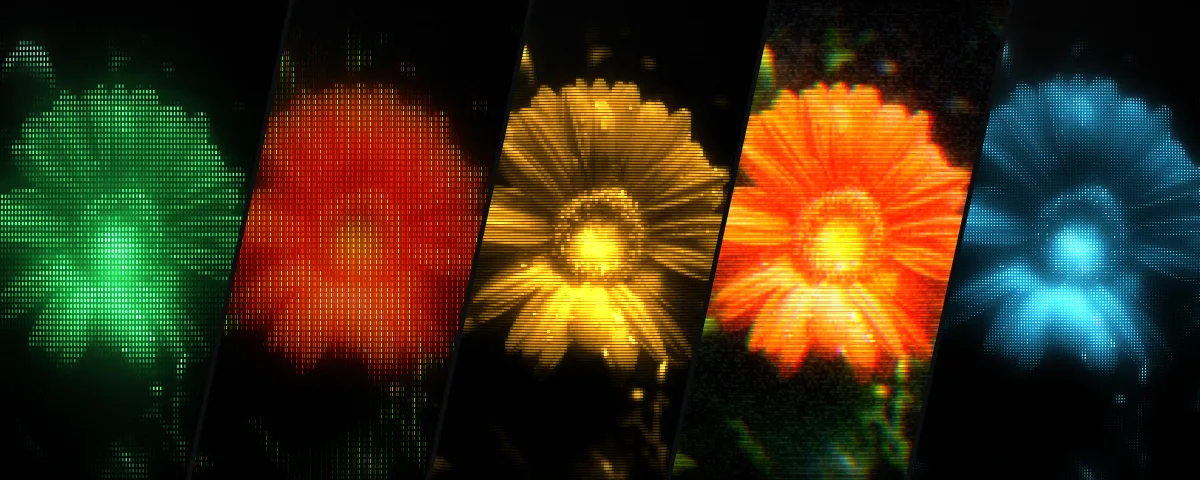
fig.1: One flower through five of Phosphor's free recipes: Terminal, Arcade, Amber, Tape and Ice.
Phosphor is free to use with ten recipes, from a green Terminal and a warm Amber monitor to Arcade, Broadcast and a worn Tape. You can download an 800 pixel PNG or a 540p video, and put the first 10 seconds of your own video on the screen. A free account adds one full-size PNG a week. Phosphor Pro is $15 once while it's in beta. It unlocks PNGs up to 3000 pixels, 720p and 1080p video, your own videos up to two minutes with their sound, and 14 more recipes, like Teletext, Night Vision and Jumbotron. It runs in your browser and nothing is uploaded, so your photos and videos stay on your computer.
Where it falls short: it's a browser tool, so there are no layers or keyframes, and it records video in real time, so a long clip takes as long as the clip. There's no GIF export yet either. For a timed edit with a screen that switches off on cue, After Effects is better. It's also new, and still in beta.
Price: Free. Phosphor Pro is $15 once (beta price).
Good: Real phosphor patterns and glow, seamless loops, words and video, private, no install.
Not so good: No layers or keyframes, no GIF export yet.
4. AnalogTV
If accuracy is what you're after, AnalogTV is in a league of its own. It doesn't fake the look of a CRT, it simulates the whole chain: the camera tube, the NTSC, PAL or SECAM signal, and then the screen, with shadow mask, aperture grille and slot mask layouts lined up to your device's real pixels. There are eight phosphor types, bloom, barrel distortion, convergence for each colour gun, vertical roll, even burn-in and a service menu with degauss.
It runs on iPhone, iPad and Apple Silicon Macs. You can use it as a camera, run your photos or videos through it, and export stills and video, with ProRes on the Mac. It's a one-off purchase with no subscription; it was $9.99 on the US App Store when I checked, and it's actively updated.
The depth is also the catch. There's a lot to learn if you just want a quick retro TV filter, and there's no Android or Windows version.
Price: One-off purchase (it varies by store; $9.99 in the US App Store in November 2026).
Good: The most authentic CRT simulation here, a camera mode, pro video export on Mac.
Not so good: Apple only, steep learning curve.
5. DaVinci Resolve Studio
If you edit video and hate subscriptions, DaVinci Resolve Studio has a CRT-style effect built in. It's called Analog Damage and it's one of the Resolve FX. It adds scan lines (with their own frequency, sharpness and colour fringing), chroma misalignment, ghosting, noise and the softness of a weak signal, with presets to start from and keyframes for everything.
It's more "bad broadcast" than "close-up of a monitor". There's no phosphor pattern, and you'll want to add curvature and glow yourself, which Resolve can do with its lens and glow effects. Analog Damage is in the paid Studio version. The free version of Resolve doesn't have it.
Price: $295 once for DaVinci Resolve Studio.
Good: Built in, keyframable, pay once.
Not so good: Not in the free version, no phosphor pattern or curvature in the effect itself.
6. effect.app
effect.app is a library of real-time effects that runs in the browser, as a desktop app, and as plugins for Figma, Photoshop and After Effects. It has two that matter here. CRT Screen does scanlines, bloom, glow, distortion and flicker. TV does scan lines, RGB distortion, noise and curvature, with animated scan lines. Both work on images and video, and the Photoshop plugin adds curvature and phosphor controls.
The draw is having the same CRT effect everywhere you work, especially inside Figma. The free plan is limited, though: 720p and five-second videos, and you need an account to export. Pro, with 4K and two-minute video, was $10 a month when I checked, and the After Effects plugin is on the top Studio plan.
Price: Free plan. Pro from $10 a month, Studio $25 a month.
Good: Works in Figma and Photoshop, images and video.
Not so good: Subscription for anything serious, small free exports.
7. Vinxle CRT filter
Of all the free online CRT filters I tried, Vinxle's has the most to it. There are twelve controls: curvature, scanlines, a phosphor mask, glow, vignette, sync jitter, convergence (the red and blue fringes), glass glare, interference, static and colour bleed. You also pick the phosphor tone: full colour, green, amber or black and white.
It takes photos (JPG, PNG or WebP) and videos up to 20 seconds, and the preview moves. You can save a photo as a still, or as an animated loop in GIF or video, which most free CRT filters can't do. It's free, with no sign-up and no watermark, and it runs on your device rather than uploading your files.
The phosphor mask is one slider, so you can't choose between dots and stripes, and 20 seconds is short for video. For a free CRT effect generator, though, it's very good.
Price: Free.
Good: Photos and video, a phosphor mask, animated GIF export, private.
Not so good: One mask style, 20-second video limit.
8. Retrotube Television
Retrotube Television is the most generous free CRT filter for video I've found. It has 57 screens in five groups (TV, Tape, Computer, Game and others), from a colour CRT, a Trinitron and a studio PVM monitor to a black and white tube, rear projection and a VHS tape. Each has six tuning knobs to play with.
You feed it a video file or your webcam, and on desktop Chrome or Edge, even a YouTube or Twitch stream. Then you snap a PNG or record an MP4 or GIF. It's free, with no account, no watermark and no upload: it all runs on your device, phones included, which also makes it the easiest CRT filter for Android.
It's built for video rather than photos, and the knobs aren't labelled with what they do, so it's a bit of trial and error. It's also one person's side project, so it's worth saving what you make.
Price: Free.
Good: 57 screens, MP4 and GIF recording, private, works on phones.
Not so good: Made for video, unlabelled controls.
9. OBS Studio with Retro Effects
OBS is the free app most streamers use, and the Retro Effects plugin turns it into a serious CRT simulator. Its CRT filter has 24 phosphor mask layouts, phosphor bloom, barrel distortion, rounded corners and vignetting, and the plugin adds scanlines, interlacing, chromatic aberration, an NTSC look, VHS and a "cathode boot" power-on.
It works on anything OBS can show, so a video, an image, your webcam or a game, and you record or stream the result. That makes it perfect for live streams and screen recordings, and awkward for a single still, where you'd need to take a screenshot. Users say it's heavy on the graphics card, too.
Price: Free and open source.
Good: 24 phosphor masks, live, works on any source.
Not so good: A streaming workflow, not a design one.
10. GIMP
GIMP has a filter most people never find: Video Degradation, under Filters > Distorts. It's a crude one, but it does the thing most free CRT filters skip. It lays a repeating pattern of red, green and blue cells over the picture, so it looks like a screen up close rather than a photo with stripes. There are several patterns to pick from, plus options to make it additive (brighter) or rotate it.
On its own it's flat. There's no glow, no scanlines and no curve, so you'll want to follow it with a blur on a Screen layer and Lens Distortion (Filters > Distorts too), the same steps as the Photoshop method above.
Price: Free and open source.
Good: A free RGB pixel pattern, at any size.
Not so good: Stills only, needs other filters to look finished.
Which CRT effect generator should you use?
For video editing, use what's already in your editor. That's Red Giant Universe's Analog in After Effects and Premiere, or Analog Damage if you're on Resolve Studio. For a free option, Retrotube records MP4s in the browser, and Vinxle handles clips up to 20 seconds.
For a still image or poster, build it in Photoshop if you need print resolution and every layer, or use Phosphor if you want real phosphor dots and glow in a couple of clicks. Vinxle is the best free online option, and GIMP the free desktop one, with a bit more work.
For social posts, a short loop gets far more attention than a still. Phosphor's loops are made for that, Vinxle can save a free GIF, and AnalogTV is the pick on an iPhone.
For streaming and live visuals, OBS with Retro Effects.
For the most realistic CRT simulation, AnalogTV. Nothing else here models the whole signal like it does.
Tips for a convincing old TV effect
Size the pixels for where it ends up. A fine phosphor pattern looks beautiful on your monitor, then turns into a wobbly moiré when Instagram shrinks it to 1080 pixels. Make the dots and scanlines bigger than feels right, and preview the post at the size people will actually see it.
Start with a dark picture. A CRT makes light, it doesn't print ink, so black backgrounds and bright subjects look best. Glowing type on black is the classic for a reason. A pale, washed-out photo turns grey and muddy on a screen.
Keep the glow on the highlights. If everything glows, nothing does. Only the brightest parts should bloom.
Go easy on the curve. A real tube bends the picture less than most filters' defaults. A little curve and darker corners are enough to say "screen".
Pick one era. A green computer terminal, an 80s arcade cabinet, a 90s Trinitron and a VHS tape on a bedroom TV all look different. Mixing them reads as "filter". Choosing one reads as a place and a time.
If you like the analogue look but want ink instead of light, I've also rounded up the best halftone generators.
Frequently Asked Questions
What is a CRT filter?
A CRT filter makes a photo, video or game look like it's on an old cathode ray tube TV or monitor. The good ones copy the tiny red, green and blue phosphors, the dark scanlines between the rows, the glow around bright areas, the curved glass and the flicker of a real screen. Simple ones just add scanlines.
What is the best free CRT filter?
For photos and short clips in the browser, Vinxle is the best free CRT filter, with a phosphor mask, glow and animated GIF export. Phosphor's free version adds real phosphor dot patterns and seamless loops, and saves a PNG or a 540p video. For longer video, Retrotube Television records MP4s for free, and OBS with the Retro Effects plugin is the free choice for streaming.
How do I make a CRT effect in Photoshop?
Photoshop has no CRT filter, so you build it in layers. Split the red and blue channels on two copies of the photo and nudge them apart, fill a layer with a two-pixel scanline pattern set to Multiply, add a blurred copy on Screen for the glow, then use Lens Correction to bulge the picture and darken the corners.
How do I add an old TV effect to a video?
In After Effects or Premiere Pro, use a CRT plugin like Red Giant Universe's Analog. In DaVinci Resolve Studio, use the Analog Damage effect. Without an editor, upload the clip to a browser tool like Phosphor, Vinxle or Retrotube Television and download the result as a video.
Why does my CRT effect look wavy on Instagram?
That's moiré. When Instagram or TikTok shrinks your image, a fine pattern of scanlines or phosphor dots clashes with the new pixel grid and makes wavy bands. Make the dots and lines bigger, export at the size the platform uses (1080 pixels wide), and check it on your phone before posting.
What's the difference between scanlines and a CRT effect?
Scanlines are just the dark horizontal lines between the rows of a CRT picture. A full CRT effect also adds the phosphor pattern, the glow, the curve of the glass, colour fringing and movement like flicker and roll. Scanlines alone can look like stripes over a photo; the rest is what makes it look like a screen.